
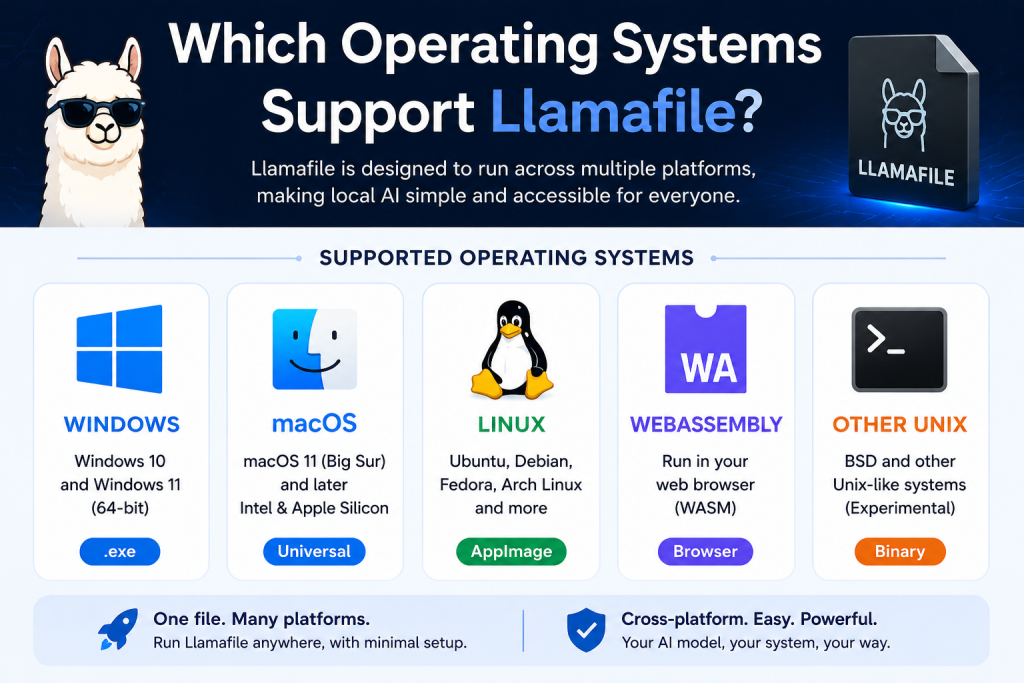
Llamafile is becoming increasingly popular in the AI and local model-running community because it allows users to run large language models easily without complex setup. One of the most common questions users ask is: Which operating systems support Llamafile?
The good news is that Llamafile is designed to be highly portable and works across multiple platforms. This makes it accessible for developers, researchers, and everyday users regardless of their device. In this article, we’ll explore all the operating systems that support Llamafile, how compatibility works, and what you need to run it smoothly on your system.
Read More: Can I Run Llamafile Offline?
What is Llamafile in Simple Terms?
Before discussing operating system support, it’s important to understand what Llamafile actually is. Llamafile is a tool that packages large language models into a single executable file. This means you don’t need to install complicated dependencies like Python environments, libraries, or frameworks.
Instead, you simply download and run the file—almost like opening a regular app. This simplicity is what makes operating system compatibility so important.
Windows Support for Llamafile
Windows is one of the most widely used operating systems, and Llamafile works very well on it.
Key Points for Windows Users
- Supports Windows 10 and Windows 11
- Runs as a standalone
.exefile - No need for additional installation steps
- Works on both Intel and AMD processors
How it works on Windows
When you download a Llamafile for Windows, you typically just double-click the executable file. It opens a terminal or browser-based interface where you can interact with the model.
Things to keep in mind
- Older versions of Windows (like Windows 7 or 8) may not be fully supported
- Performance depends on your hardware (RAM and CPU/GPU)
Windows users benefit from the simplest setup experience, making it one of the most beginner-friendly platforms for Llamafile.
macOS Support for Llamafile
Llamafile also runs smoothly on macOS, making it a great option for Apple users, including developers and designers.
Supported macOS versions
- macOS 11 (Big Sur) and later
- Works on both Intel Macs and Apple Silicon (M1, M2, M3)
Features on macOS
- Native support through executable files
- Optimized performance on Apple Silicon chips
- Easy drag-and-drop execution
Performance notes
Apple Silicon devices often perform better due to optimized architecture and higher efficiency in handling AI workloads.
For Mac users, Llamafile provides a seamless experience without requiring terminal-heavy setups or external package managers.
Linux Support for Llamafile
Linux is one of the most important platforms for Llamafile, especially for developers and AI researchers.
Supported Linux distributions
- Ubuntu
- Debian
- Fedora
- Arch Linux
- Most modern Linux distributions
How it runs on Linux
- Executable binary format
- Can be run via terminal
- No dependency-heavy installation required
Advantages on Linux
- Highly stable performance
- Better control over system resources
- Ideal for server environments and AI testing
Linux users often prefer Llamafile because it integrates well with scripting, automation, and development workflows.
BSD and Other Unix-Based Systems
Llamafile is also compatible with some BSD-based systems, though support may vary depending on the environment.
Supported systems include
- FreeBSD (partial support)
- Other Unix-like environments (experimental support)
While not as commonly used as Windows, macOS, or Linux, these systems can still run Llamafile if they meet required compatibility conditions.
WebAssembly (Browser-Based Support)
One of the most interesting features of Llamafile is its ability to run in a browser using WebAssembly (WASM).
What this means
- You can run Llamafile directly in a web browser
- No installation required
- Works across all major operating systems
Supported browsers
- Google Chrome
- Microsoft Edge
- Firefox
- Safari (with limitations depending on version)
Benefits
- Instant access without setup
- Cross-platform compatibility
- Great for testing and demonstrations
This makes Llamafile extremely flexible, especially for users who don’t want to install software locally.
Hardware Compatibility (Important Factor)
Even though we are discussing operating systems, hardware plays a big role in performance.
Minimum requirements (general)
- 8GB RAM (16GB recommended for better performance)
- Modern 64-bit processor
- At least basic GPU support (optional but helpful)
Better performance systems
- Apple Silicon Macs
- Linux machines with powerful CPUs
- Windows PCs with dedicated GPUs
Llamafile is optimized to run even on modest hardware, but performance improves significantly with better specs.
Cross-Platform Portability Advantage
One of the biggest strengths of Llamafile is its portability. Unlike traditional AI setups that require complex installation steps, Llamafile is designed to “just work” across systems.
Key benefits
- Same file format across platforms (with variations for OS)
- No need for environment configuration
- Easy sharing between users
- Consistent model behavior across systems
This makes it especially useful for developers who work on multiple operating systems.
Common Issues and Compatibility Tips
Even though Llamafile supports many operating systems, users may face occasional issues.
Common problems
- File not executing (permission issues on Linux/macOS)
- Antivirus blocking execution on Windows
- Slow performance on low-end devices
Solutions
- On Linux/macOS, use
chmod +x filenameto allow execution - Whitelist the file in antivirus software
- Close background applications to improve performance
Keeping your system updated also helps avoid compatibility issues.
Future of Llamafile OS Support
The future looks promising for Llamafile in terms of compatibility. Developers are continuously improving cross-platform support to make it even more universal.
We can expect:
- Better Windows optimization
- Improved Apple Silicon performance
- Expanded browser-based AI capabilities
- More lightweight builds for older systems
As AI tools evolve, Llamafile is likely to remain one of the most accessible solutions for local model execution.
Conclusion
Llamafile supports a wide range of operating systems, including Windows, macOS, Linux, and even browser-based environments through WebAssembly. Its cross-platform design makes it one of the most flexible AI tools available today.
Whether you are a Windows user looking for simplicity, a Mac user wanting smooth performance, or a Linux developer needing full control, Llamafile offers a solution for everyone. With its lightweight design and easy execution, it removes the traditional barriers of running AI models locally.