
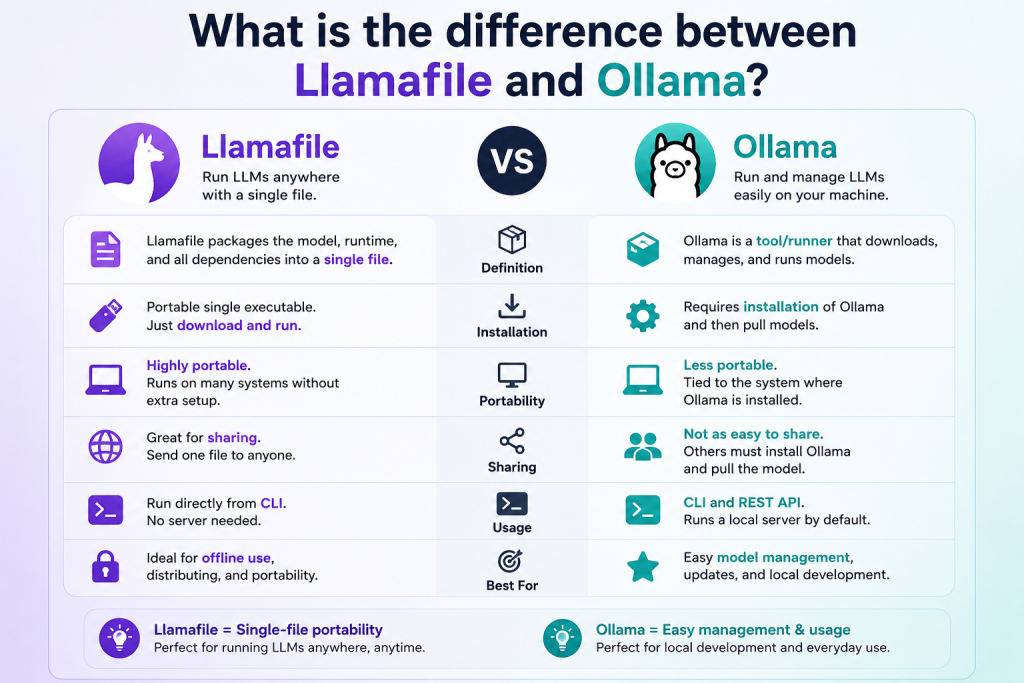
In the world of local AI tools, both Llamafile and Ollama have gained popularity for running large language models (LLMs) directly on your computer without relying on cloud services. This makes them useful for privacy, offline access, and faster experimentation. However, many beginners get confused about how they differ and which one is better for their needs.
While both tools aim to simplify running AI models locally, they work in different ways and offer unique features. In this article, we will explore the key differences between Llamafile and Ollama in a simple, user-friendly way so you can choose the right tool.
Read More: How Much RAM Do I Need to Run Llamafile?
What Is Llamafile?
Llamafile is a lightweight way to run AI models in a single file format. It combines the model and the runtime into one executable file, meaning you can run an AI model without complex installation steps.
One of the biggest advantages of Llamafile is its simplicity. You just download a file and run it like a normal application. It is designed to be portable, so you can easily share or move it between systems without setup issues.
Key features of Llamafile include:
- Single-file execution (model + runtime combined)
- No heavy installation required
- Works offline after download
- Highly portable across systems
- Easy for beginners to try AI models quickly
Llamafile is especially useful for users who want a “plug-and-play” AI experience without dealing with technical setup.
What Is Ollama?
Ollama is a more advanced local AI platform that helps you download, manage, and run large language models on your computer. Unlike Llamafile, it works like a system or service where you can pull different models and interact with them using commands or APIs.
Ollama is widely used by developers because it supports multiple models and integrates easily into applications.
Key features of Ollama include:
- Easy model downloading and management
- Supports multiple AI models (like LLaMA-based models)
- Command-line interface for control
- API support for app development
- Regular updates and active community
Ollama is more flexible and powerful, especially for developers and advanced users who want control over different AI models.
Llamafile vs Ollama: Key Differences
Although both tools allow you to run AI models locally, they are built with different goals in mind. Here is a clear comparison:
Installation and Setup
Llamafile:
- No installation needed
- Just download and run a single file
- Extremely beginner-friendly
Ollama:
- Requires installation
- Runs as a background service
- Needs basic command-line usage
👉 Winner: Llamafile (for simplicity)
Ease of Use
Llamafile:
- Very simple interface
- Ideal for quick testing
- Minimal configuration
Ollama:
- Slight learning curve
- Uses terminal commands
- More control options
👉 Winner: Llamafile (for beginners)
Model Management
Llamafile:
- Each model is a separate file
- No central management system
Ollama:
- Built-in model library
- Easy downloading and switching between models
- Organized system for handling multiple models
👉 Winner: Ollama (for flexibility)
Performance and Optimization
Llamafile:
- Optimized for portability
- Performance depends on the bundled model
Ollama:
- Better optimized runtime engine
- Efficient memory usage
- Suitable for large-scale usage
👉 Winner: Ollama (for performance control)
Developer Support
Llamafile:
- Limited API or integration features
- Mostly for standalone use
Ollama:
- Full API support
- Easy integration into apps and workflows
- Popular among developers
👉 Winner: Ollama (for developers)
Use Cases
Llamafile is best for:
- Beginners exploring AI models
- Offline AI usage
- Quick testing without setup
- Portable AI applications
Ollama is best for:
- Developers building AI apps
- Advanced users managing multiple models
- API-based projects
- Long-term AI workflows
Which One Should You Choose?
Choosing between Llamafile and Ollama depends on your needs.
If you want something simple, fast, and easy to run without installation headaches, Llamafile is the better choice. It is perfect for beginners or casual users who just want to experiment with AI.
On the other hand, if you need more control, model management, and developer-friendly features, Ollama is the stronger option. It is designed for people who want to build applications or work deeply with AI models.
Conclusion
Both Llamafile and Ollama are powerful tools for running AI models locally, but they serve different audiences. Llamafile focuses on simplicity and portability, while Ollama focuses on flexibility and developer control. There is no “one-size-fits-all” answer—your choice depends on whether you prefer ease of use or advanced features. Understanding these differences will help you pick the right tool for your AI journey and make the most of local AI technology.