
Llamafile has become a popular way to run large language models locally without needing complex setups or cloud services. It allows users to execute AI models directly on their own computer in a single file format, making it fast, portable, and easy to use. However, one of the most common questions users ask is: how much RAM do I actually need to run Llamafile smoothly?
The answer depends on the size of the model you choose and how you plan to use it. In this article, we’ll break down RAM requirements in a simple way so you can understand what works best for your system.
Read More: What AI Models Are Compatible with Llamafile?
What is Llamafile?
Llamafile is a lightweight and portable format that lets you run AI language models locally on your computer. Instead of installing heavy frameworks or depending on internet-based APIs, Llamafile bundles everything into a single executable file.
This makes it ideal for developers, students, and AI enthusiasts who want offline access to language models. It supports different model sizes, which directly affects performance and RAM usage. So, understanding your system’s memory capacity is important before choosing a model.
Why RAM Matters for Llamafile
RAM (Random Access Memory) is one of the most important factors when running AI models locally. Llamafile loads the model into memory so it can generate responses quickly.
If your system has low RAM, the model may:
- Run slowly or lag
- Crash during processing
- Fail to load larger models
- Consume too much swap memory (which reduces performance)
On the other hand, having enough RAM ensures smooth and fast AI responses without interruptions.
Minimum RAM Requirements
If you are just starting or testing small models, here are the basic RAM requirements:
4GB RAM (Bare Minimum)
- Only very small models will run
- Performance will be slow
- Not suitable for multitasking
- Good only for experimentation
This is the absolute minimum, and you may face limitations frequently.
Recommended RAM for Smooth Performance
8GB RAM (Basic Usage Level)
- Small to medium models run properly
- Decent response speed
- Suitable for casual use and learning
- Limited multitasking while running Llamafile
8GB RAM is considered the entry-level sweet spot for most beginners using Llamafile.
Ideal RAM for Best Experience
16GB RAM (Recommended Standard)
- Medium and large models run smoothly
- Faster response times
- Better multitasking ability
- Stable performance for development work
This is the most recommended setup for users who want consistent and reliable performance without frequent slowdowns.
High-End Usage
32GB RAM or More (Power Users)
- Large AI models run efficiently
- Excellent performance for heavy workloads
- Ideal for developers and researchers
- Supports multiple applications running simultaneously
If you plan to experiment with advanced models or use Llamafile professionally, 32GB or higher is the best choice.
How Model Size Affects RAM Usage
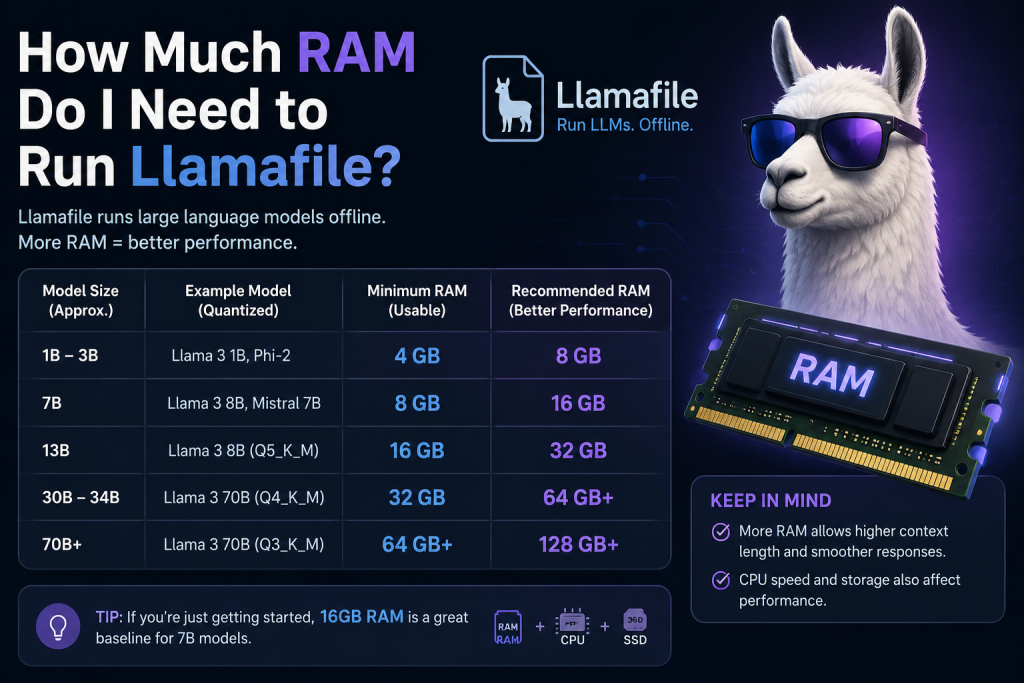
Not all AI models require the same memory. The RAM usage depends on the number of parameters and quantization level.
Here’s a simple breakdown:
- Small models (1B–3B parameters): 4GB–6GB RAM
- Medium models (7B parameters): 8GB–12GB RAM
- Large models (13B parameters): 16GB–24GB RAM
- Very large models (30B+ parameters): 32GB+ RAM
The bigger the model, the more memory it needs to store and process information.
Other Factors That Affect RAM Usage
Besides model size, several other things also impact memory usage:
Background Applications
Running Chrome, games, or editing software alongside Llamafile increases RAM usage.
Operating System
Windows usually uses more RAM compared to lightweight Linux distributions.
Model Optimization (Quantization)
Compressed models use less RAM but may slightly reduce accuracy or quality.
Context Length
Longer prompts and conversations require more memory.
Tips to Run Llamafile Smoothly on Low RAM
If you have limited memory, you can still optimize performance:
- Close unnecessary background apps
- Use smaller or quantized models
- Avoid multitasking during usage
- Prefer lightweight operating systems like Linux
- Increase virtual memory (swap file) if needed
These steps can help improve performance even on 4GB or 8GB systems.
Which RAM Should You Choose?
Here’s a simple recommendation guide:
- 4GB RAM: Only for testing and learning basics
- 8GB RAM: Good for beginners and casual use
- 16GB RAM: Best balance of speed and performance
- 32GB RAM+: Ideal for advanced users and developers
If you are serious about AI experimentation, 16GB is the safest choice.
Conclusion
The amount of RAM you need to run Llamafile depends mainly on the size of the AI model and how you use it. While 4GB can handle very small models, it is not practical for real usage. For most users, 8GB is workable, but 16GB RAM provides the best overall experience in terms of speed, stability, and multitasking. Power users and developers should consider 32GB or more for large-scale models. Choosing the right RAM ensures smooth performance and helps you get the most out of Llamafile without frustrating slowdowns.